Preliminary Results
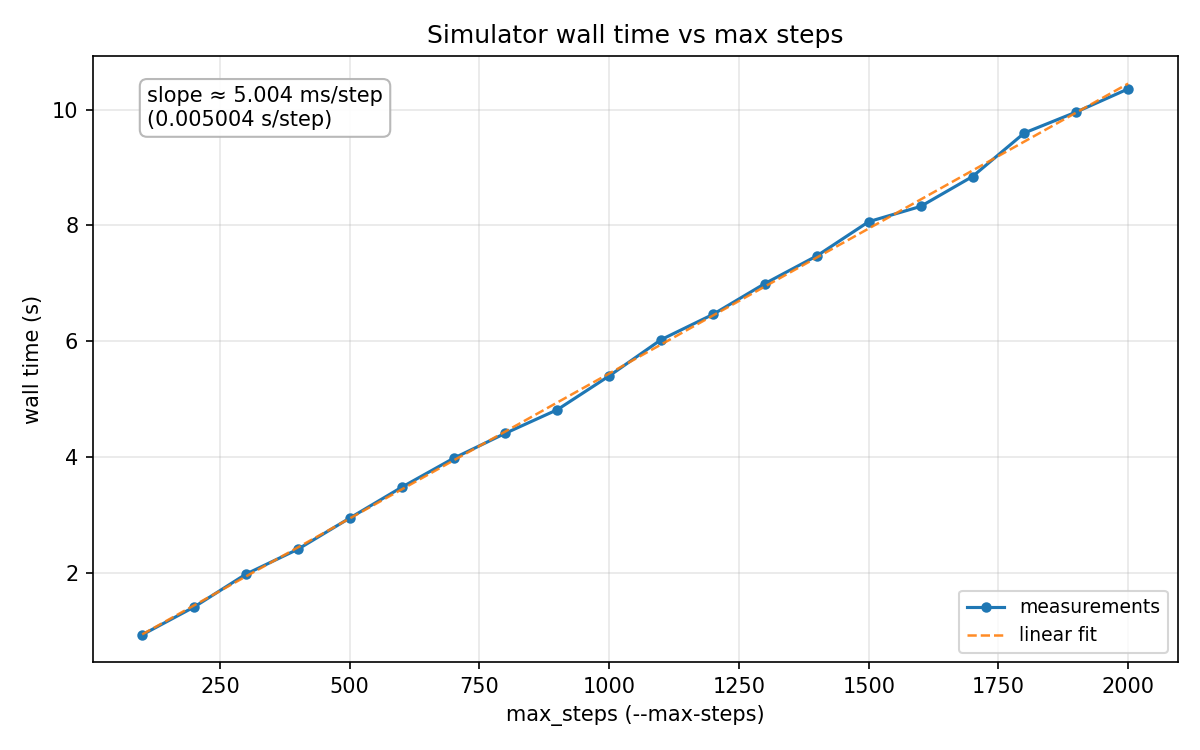
The time per time step was found by simulating for a different number of steps and checking time. It is all but linear scaling and takes around 5 ms per step.
We have completed the serial implementation of the SPH magic 8 ball simulator with a 6 sided die. The simulator uses spatial hashing to enable particles to quickly find neighboring particles that they might be interacting with. We also have a renderer that allows for visualizing the simulation as new frames are generated or asynchronously with a sim state file. The simulator also allows for user defined disturbances to the ball (like shaking or rotating) during simulation. We’ve written the code to maximize separation so that we will be able to switch to a GPU accelerated implementation with little to no reorganization needed.
Multiple dice interacting simultaneously (two-way coupling: die-to-fluid, fluid-to-die, and die-to-die collisions).
Transitioning from cubes to D4, D12, D20, or non-convex geometries and non-uniform dice with biased internal weighting.
Modeling fluids with varying densities (stratification) or temperature gradients to observe buoyancy and thermal convection.
| Week | Focus |
|---|---|
| 1 | Learn basic physics and scaffold a CPU implementation. |
| 2 | Finish CPU implementation and create a basic visualizer. |
| 3 | Start porting logic over to the GPU (CUDA). |
| 4 | Finish porting and ensure stability on the GPU. |
| 5 | Final performance optimizations and final report. |
| Week | Focus |
|---|---|
| 1 | Learn basic physics and scaffold a CPU implementation. |
| 2 | Write CPU implementation |
| 3 | Get CPU implementation fully working |
| 4 | Port over to GPU |
| 5 | Final performance optimizations and final report. |
It took us longer than expected to write the CPU implementation primarily because of our lack of physics understanding and so we are running a bit behind schedule. I think that the way we wrote our code has a simpler path to parallelizing than initially anticipated because there’s pure functions that we have to turn into kernels and so we don’t need to refactor the codebase whatsoever and can focus on CUDA optimization.
We will show a demo of our simulation running in real time and possibly allowing the users to perturb the sphere in real time along with graphs to show speedups.
The time per time step was found by simulating for a different number of steps and checking time. It is all but linear scaling and takes around 5 ms per step.
I think our largest issues are with some bugs in the physics primarily related to boundary conditions as well as how exactly to set up the controls. We have a possible fix for the physics issue which we will implement over the next few days. In terms of the controls issue, we’ve had success with using a controls file instead of keyboard inputs and for now we’re going to stick with this and make keyboard controls a nice to have.